
HoundDog.ai
Section titled “HoundDog.ai”Deterministic Privacy Code Scanner for GDPR Data Mapping Evidence and Proactive AI Governance
HoundDog.ai builds lightweight, Rust-based code scanners that give you a living, code-derived view of the services, APIs, data flows, and external integrations across the software you build. Deterministic analysis, refreshed on every commit, across every repo.
Need org-wide gRPC service mapping for your AI coding agents, covering every service, API, and field across monorepos and microservices? See ProtoMap.
Privacy Code Scanner
Section titled “Privacy Code Scanner”The Privacy Code Scanner provides deterministic, code-level evidence of sensitive data flows across logs, storage, APIs, third parties, and AI integrations.
Surveys go stale. Privacy platforms infer flows after deployment. AI-only approaches produce inconsistent evidence and waste tokens on discovery. Our engine continuously maps what developers actually implement, including shadow AI and SDKs, with accurate, reproducible results as code changes.
A fast, deterministic engine handles discovery, and AI is used selectively for reasoning and context. That means predictable performance and minimal latency, so the scanner runs directly in CI on standard CPU infrastructure.
It powers Replit’s Security Agent at massive scale (100k daily scans) and is used by Fortune 1000 companies across technology, finance, and healthcare.
Use Cases
Section titled “Use Cases”- Prevent sensitive data leaks. Catch leaks into application logs and other risky mediums before they reach production.
- Enable proactive AI governance. Discover AI integrations and see exactly what types of data are shared with them.
- Ground GDPR data mapping in code evidence. Give privacy teams deterministic evidence of actual data flows so they can prevent risks instead of documenting them after the fact.
- Keep RoPA updated at development speed. Reflect new categories of personal data and subprocessors as developers introduce them, instead of lagging one or two quarters behind the code.
HoundDog.ai in Action
Section titled “HoundDog.ai in Action”With the self-hosted or cloud platform, your organization’s data map becomes queryable in plain English:
- An AppSec engineer asks where auth tokens are leaking in plaintext into application logs.
- A privacy engineer asks which third-party integrations receive PII.
- An AI governance team asks which AI integrations exist and what sensitive data reaches them.
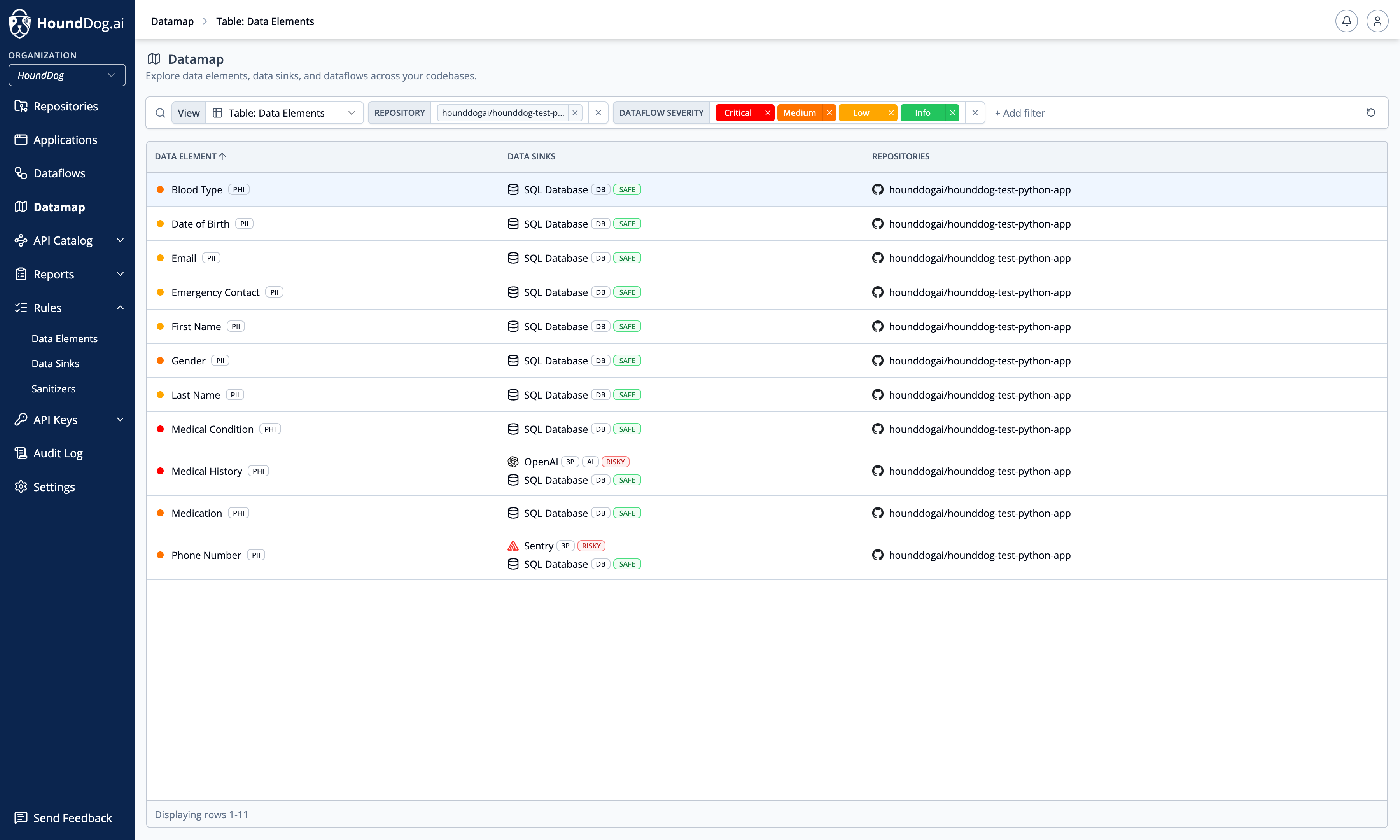
For example, “Which third parties receive PII?” queries the underlying dataflow graph and returns the relevant integrations, sensitive data elements, repositories, and risk status.
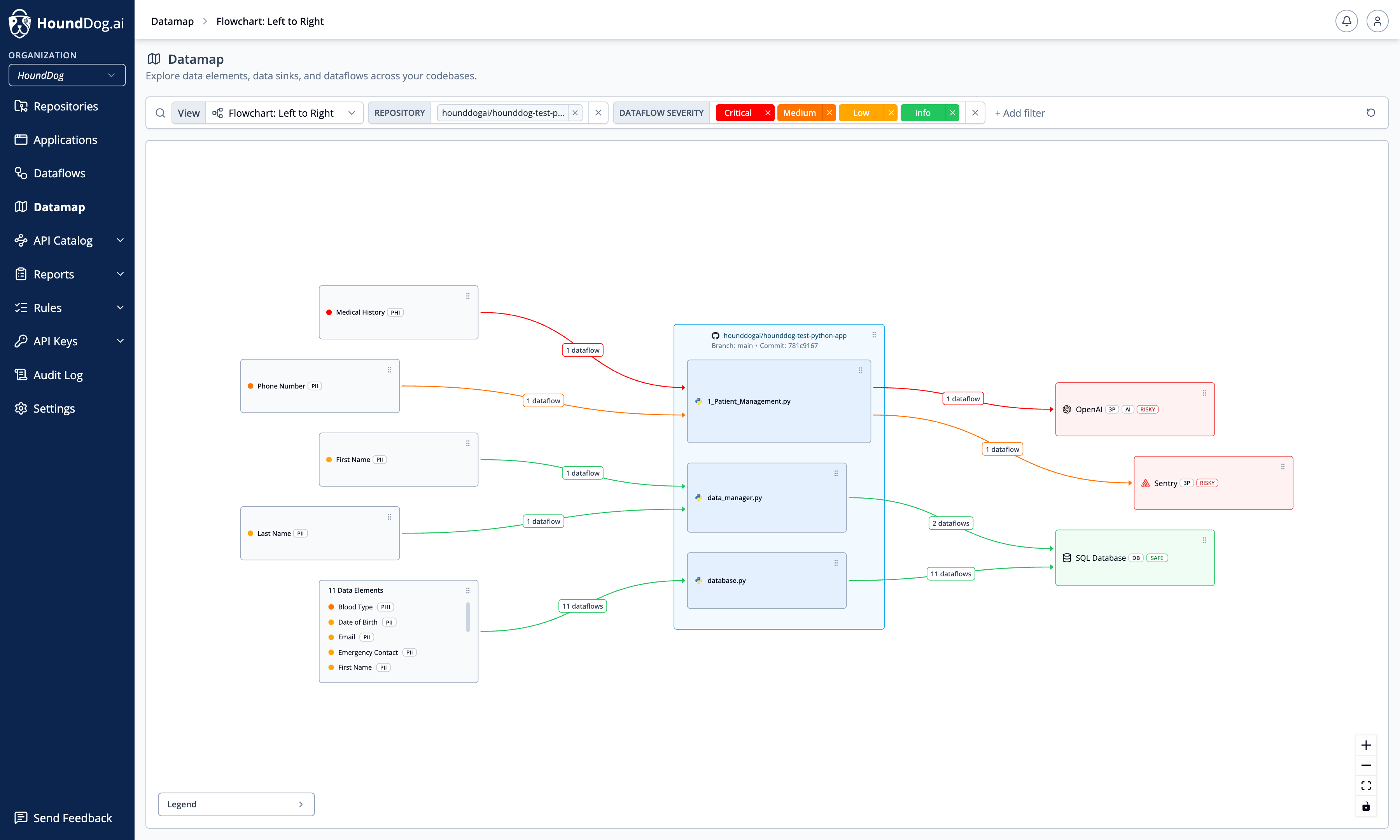
The data map becomes more than documentation. It becomes an interface to sensitive data flow evidence across your codebases, refreshed on every commit, across every repo. See Datamap to learn how it works.
Cloud Platform
Section titled “Cloud Platform”The Cloud Platform is the central management layer for the CLI. Scans always run in your environment — locally, in your CI pipelines, or in your IDE-adjacent tooling — and your source code never leaves it. The CLI uploads scan results to the platform, where your organization can triage risky dataflows, customize scan rules, generate audit-ready privacy reports, and query its data map in plain English:
- Datamap: Explore data elements, data sinks, and dataflows across your codebases in flowchart and table views. When AI is enabled — using the HoundDog.ai-managed model or your organization’s own AI provider — query your organization’s datamap in plain English: for example, an AppSec engineer asks where auth tokens are leaking in plaintext into application logs, a privacy engineer asks which third-party integrations receive PII, and an AI governance team asks which AI integrations exist and what sensitive data reaches them.
- Repositories: Overview of all code repositories scanned by HoundDog.ai, with scan history and per-repository settings.
- Dataflows: Triage sensitive dataflows discovered in your codebases — review severity, change status, run AI reviews, and file Jira or Linear tickets.
- Privacy Reports: Keep Records of Processing Activities (RoPA) updated as new personal data and subprocessors are detected in source code.
- Scanner Rules: Customize the scan rules for data elements and data sinks that every scan in your organization uses.
- API Keys: Personal keys for local development and organization keys for CI/CD.
- Audit Log: Review actions performed by users of your organization.
- Integrations and settings: Source Control, Notifications, Ticket Tracking, AI Integration, and Roles and Permissions.
How It Fits Together
Section titled “How It Fits Together”- Install the CLI and authenticate it with an API key.
- Scan a repository — the CLI downloads your organization’s scan rules and configuration, runs the scan in your environment, and uploads the results.
- The repository appears under Repositories, and detected dataflows appear under Dataflows for triage.
- Rule changes you make in the platform (for example, disabling a data element or allowlisting data elements for a sink) apply automatically to every subsequent scan in your organization.
Self-Hosted Platform
Section titled “Self-Hosted Platform”As part of the Enterprise plan, organizations can install the full platform on premises. The installation includes both the platform, which runs in lightweight Docker containers, and the CLI scanner. For POCs, the entire installation can run on a developer machine. See Self-Hosted Platform for more details.
Technical Highlights
Section titled “Technical Highlights”- Deterministic static analysis. The same commit produces the same result, every time. No prompt sensitivity, and your AI tokens are saved for higher-value work like reasoning over detected flows.
- Deep dataflow tracing. Tracks sensitive data such as PII, PHI, CHD, and auth tokens through transformations across files, functions, and procedures, regardless of nesting depth. Flows are flagged when they reach a sink, whether controlled (a database) or high-risk (an LLM prompt or application logs).
- Broad coverage, fully customizable. 100+ sensitive data types and 800+ data sinks supported out of the box. You can also create your own data element and data sink rules.
- Built for large codebases. Scans 1M+ lines of code in seconds on modern laptops.
- Optional AI integration (highly recommended). Uses your organization’s own AI provider and API key (see FAQ). AI reduces false positives, adds context, and lets you query the data map in plain English. It only sees the code segments associated with each finding’s dataflow trace.
Does your scanner use AI?
Section titled “Does your scanner use AI?”Scans run on a deterministic static analysis engine, which keeps them fast, cheap, and free of hallucinations. Nothing from a scan is sent to an AI provider unless your organization enables the optional AI integration.
Optional AI integration (Enterprise, cloud and self-hosted). The Cloud Platform provides a HoundDog.ai-managed model out of the box, and organizations on both the cloud and self-hosted platforms can choose their own provider (AWS Bedrock, Anthropic, OpenAI, Google Gemini, or Microsoft Azure OpenAI) and API key. When your own provider is used, findings and the code segments in their dataflow traces go directly to that provider under the DPA and terms your organization holds with it. The AI layer auto-closes false positives, adjusts severities, and adds context to findings the scanner already produced. The deterministic scan still runs in your CI on inexpensive CPU with negligible impact on CI time. See AI Integration for setup.
Rule development. HoundDog.ai uses AI internally to help generate and update detection rules before they ship with the scanner. Customer code and scan results are never used for this, and HoundDog.ai does not use customer code, findings, prompts, or responses to train AI models.
Why not just use an LLM?
Section titled “Why not just use an LLM?”We recommend using both. HoundDog.ai is built to make your AI more effective, not to replace it.
- Spend tokens on reasoning, not discovery. The scanner finds and traces sensitive data flows, so your AI tokens go to higher-value work like assessing risk, reviewing flows, and answering questions about your data map.
- Evidence you can stand behind. The same commit always produces the same result. That reproducibility makes findings usable as evidence for GDPR data mapping, RoPA, and audits, where AI-generated output that varies with the prompt may not yet be accepted.
- Easy to roll out org-wide. The Rust scanner runs in CI on standard CPU infrastructure, across every repo and every commit, with negligible impact on build times.
How is this different from secrets scanners like GitLeaks or TruffleHog?
Section titled “How is this different from secrets scanners like GitLeaks or TruffleHog?”Secrets scanners find credentials hardcoded in code, such as API keys, passwords, or tokens:
exposed_api_key = "sk-proj-1234567890-abcdefghijklmnopqrstuvwxyz"HoundDog.ai tracks how sensitive data actually flows through code, across assignments and transformations:
import loggingimport os
logger = logging.getLogger(__name__)
# HoundDog.ai detects that `foo` is an authentication token.foo = os.environ.get("MY_API_KEY")
# HoundDog.ai traces values through various code paths.bar = {"message": f"api_key={foo}".strip()}
# HoundDog.ai detects that `bar` contains an authentication token (tainted) and is leaked to a log.logger.info("data=%s", bar)
How is this different from Semgrep or CodeQL?
Section titled “How is this different from Semgrep or CodeQL?”Semgrep and CodeQL are powerful and highly customizable, but their rules take significant upfront investment to learn and maintain.
HoundDog.ai works out of the box: broad, high-quality coverage of data elements and sinks from day one, with custom rules when you need them. It is purpose-built for dataflow analysis, scales efficiently to large codebases, and detects complex flows that general-purpose tools miss.
Security and Trust
Section titled “Security and Trust”Visit the HoundDog.ai Trust Center for the latest SOC 2 report, penetration testing results, and SBOM details.
Contact
Section titled “Contact”If you need help or would like to send feedback, create a GitHub issue or email us at [email protected].