This page explains how you can integrate HoundDog.ai's code scanner with Jenkins Pipeline.
Prerequisites
Your Jenkins agent(s) must have to the following:
Docker Engine version 20.x or later
Git version 2.x
Minimum 2 GBs of memory allocated to Docker
Public internet access for both the host and the guest containers
Defining the Required Pipeline Variables
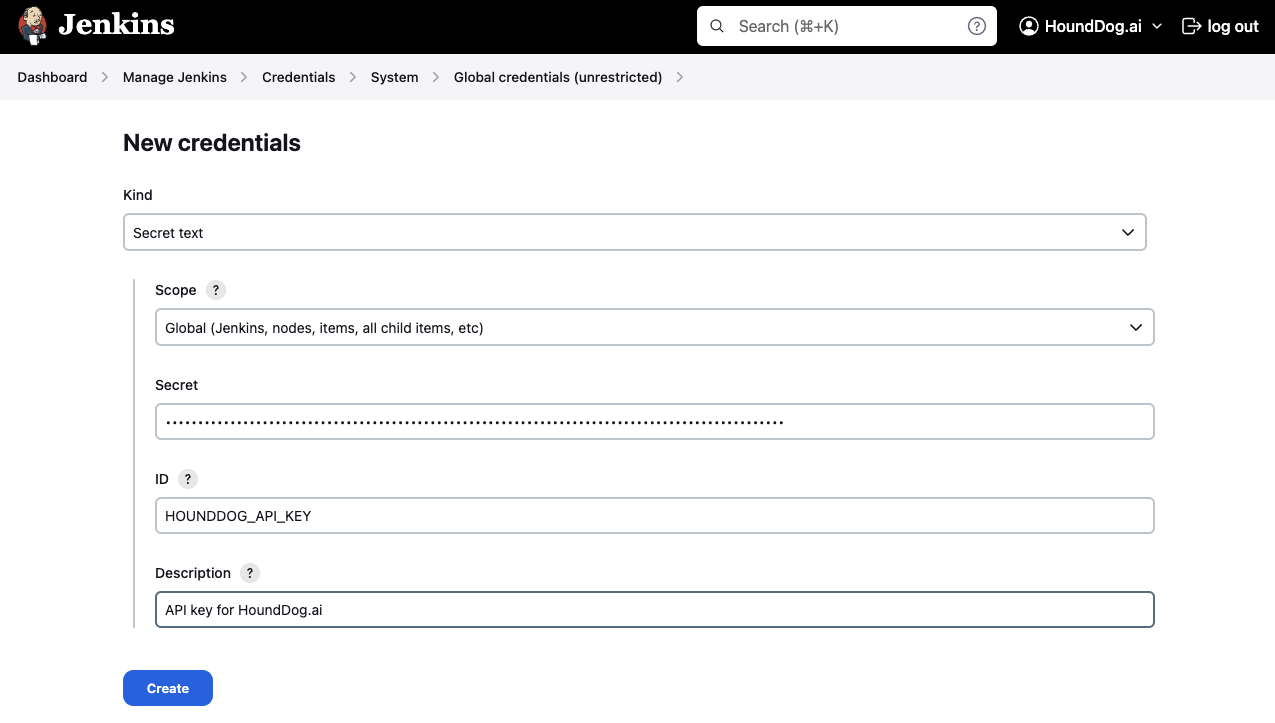
First, follow the steps in API Keys to generate a HoundDog.ai API key. Then follow the steps in the Jenkins documentation to create a secret text credential named hounddog-api-key using the value of your new key. Here is an example screenshot:
Defining the Scan Step in Jenkinsfile
Next, add a new step in the Jenkinsfile file at the root of your repository. Here is an example which scans your repository and uploads the results to HoundDog.ai Cloud Platform:
Blocking the Pipeline Upon Detecting Vulnerabilities
HoundDog.ai's code scanner exits with return code 0 (success) by default. To halt the pipeline upon detecting vulnerabilities, provide the --fail-severity-threshold option to the hounddog scan command:
To view all available command-line options for the hounddog scan command, see Scanner Configuration.